
Workstation.INI #
Configuration #
The auWksAurora.ini file reflects local workstation settings for pathways to utilities, as well as the default dr2 and location of the Aurora_Client directory. It is held in the workstation directory: \<Program Files>\Aurora Information Technology. <Program Files> is a generic name and this may vary across Operating Systems (e.g. 64bit) and across international Cultures.
Default #
The Default section identifies the DR2 instance in Aurora_Client below that is to be employed in the Aurora environment.
| Setting | Comments |
|---|---|
| Default= | sets the specific dr2 definition to be used per Aurora_Client. |
| AWS_URL= | sets the URL for AWS [Aurora Web Services] e.g.
AWS_URL=http://localhost/AWS/AWS.asmx Where localhost is the required local database server, and this can be replaced by the appropriate network identifier for that server. For full information, see the Aurora Web Services installation manual. |
Test configuration #
To have a TEST option there must also be a Test AWS instance setup. It can be the same software version as live – but importantly, it need not be, and in a typical test environment it probably wont be.
In this example image, there is a 2nd instance of AWS called AWS_Test This exact name needs to also be used on customer sites, if a test database is to be put in place.
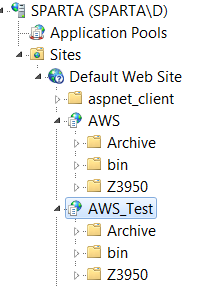
The [Settings] section in this file remains the same on each workstation and on the server running AWS instances
[Settings]
EIn=NSHOR
The [Default] section in this file for an operator that needs a test database connection now has a new entry e.g. as in bold below:
AWS_URL=http://localhost/AWS/AWS.asmx
AWS_TEST_URL=http://localhost/AWS_TEST/AWS.asmx
When the operator invokes Desktop now, they will see a preliminary screen inviting selection of the Live or Test Environment.
Settings #
This section contains fundamental settings for a given institution and its bibliographic database.
| Setting | Comments |
|---|---|
| BibID= | Sets the identifier for bibliographic records, to be used within the standard bibliographic database; usually [but set as ‘B’ for Rural Libraries Queensland] |
| EIn= | Sets the national identifier for the institution (where available; AIT will assign an alternative if necessary), and must correspond to the setting defined in Inst_Institutions. IN_This. |
| MultimediaFolder= | Defines a network drive for images, as it is necessary to allow such a network path to allow more than one operator to access images concurrently. For example, H can be set, where H: is a network drive (it can be any path) where images are stored – in the AIT directory structure – and libraries need to do the same, e.g.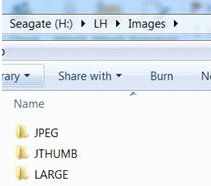 This is required to ensure that local multimedia folders holding source files – such as images and Cloud structures are synchronised. In turn, this is necessary to allow the main image and thumbnail files, when uploaded, to be stored in the same directory structure in the Cloud. |
| Environment_SpecialFolder= | Aurora Desktop allows the flexibility to have the associated XML parameter and offline files saved to any defined .Net Framework ‘Environment.SpecialFolder’.Initially, this capability is restricted to a maximum of two folder options (others may be made available as and when required).
|
Z39.50 #
| Setting | Comments |
|---|---|
| Favourites= | allows the library to define ‘favourite’ remote library sites for use in Desktop searching (2.10.5 or later). Multiple sites may be defined – each target must be terminated with the caret (^) character, and must have the same name as defined in the Z3950Sites file, e.g.:
Favourites=State Library of Western Australia (LISWA)^University of Oxford^ |
| Public= | Each new version of the Aurora Cloud Desktop application removed the application’s pointer to the Z39.50 file location. (This is evident only in the web installed version, as Microsoft changes the installation directory for each iteration, while in a fixed MSI installation the folder persists. This setting (Desktop 3.7.30 and later) now allows the persistent definition of the path, e.g. (for the general target definitions):
Public=C:\Program Files (x86)\Aurora Information Technology\Z3950sites.xml The Z39.50 site files need not be on the c: drive as above; and use of a network drive will be better. That way all operators are able access the same file, and only that one file then needs to be updated. |
| Private= | This should be the same as for Public above, but defines the location of the institution’s private file, containing user ids and psswords, e.g.
Private=C:\Program Files (x86)\Aurora Information Technology\Z3950sites_Private_<InstID>.xml |
Utility #
The utility section sets the path and filename for each of a number of common utilities used throughout the Aurora applications.
| Setting | Comments |
|---|---|
| MSWord= | sets the path and filename for WinWord – the MS Word executable. |
| MSExcel= | Sets the path for the MS Excel executable. |
| DOC= | sets the path and filename for WordView – the read-only viewer for MS Word |
| PDF= | sets the path and filename for Adobe Acrobat – the PDF viewer |
| AVI= | sets the path and filename for the media player used for viewing avi movie files |
| WAV= | sets the path and filename for the media player used for playing .wav sound files |
| CHR= | sets the path and filename for the Windows Character Map |
| HTM= | sets the path and filename for the preferred Internet Browser |
| msoEncoding= | this optional setting allows determination of default character set in Backroom applications, such as Notices. The values available are:
|
Aurora_Client #
This section identifies the path and filename for each dr2 file that is defined in the system. There is no limit to the number of dr2 files that may be configured.
| Setting | Comments |
|---|---|
| AuroraXXX=path and filename | sets the path and filename for the dr2 file – normally this will be in the Aurora Programs directory. |
Suppliers #
The Suppliers section defines approved and locally added supplier details for the purposes of storing and loading Shelf-ready records.
| Setting | Comments |
|---|---|
| ApprovedHoldings | Lists suppliers who have been formally approved for shelf-ready records by AIT, e.g.
|
| Standard852Holdings | allows for local addition of suppliers who use a standard approach to holdings for shelf ready records, using MARC 852 tags. Incoming data should be checked, and if any query, please check with AIT. Supplier names must be separated by | (upright bar), e.g.:
|
Desktop settings for email notices #
[Email] #
The Email section holds the definitions for email communications. Note that Backroom (from ver 2.7.13 and late) will copy email settings into the Inst_Enterprise table, and will obey those settings, and not the ini file settings thereafter.
| Setting | Comments |
|---|---|
| MailServerAddress= | denotes the DNS or IP name of the mail server – in this case used for despatch of Overdue Notices |
| OverdueFromAddress= | Sets the mailbox address indicated as the sender of the notice – important if returns are to be expected and to be dealt with. |
| ReserveNoticesFromAddress= | Defines the name to be presented in the email ‘From’ line. |
[Local Folders] #
| Setting | Comments |
|---|---|
| AuroraWork=C:\Aurora\Aurora_Client\Client\Work | sets the path for the Aurora Work directory, which holds all logs and working files. Note that this folder may accumulate over time, especially in larger operations, as logs and other operational files are created: a task is available to purge all files over a year old. |
| AuroraTemplates=C:\Aurora\Aurora_Client\Client\Programs\Templates | gives the path for the Aurora Templates directory, which holds the base templates for all forms of Notice |
| WebTemplates=http://www.auroracloud.com.au/auroratemplates | This is the central folder holding revised HTML style templates for use in Desktop Notices operations. These templates need to be set up prior to running Notices in Desktop. The filenames are consistent with existing templates files, except now using the htm extension, e.g. Overdue_1XXXX.htm where XXXX is the institutional identifier. The exception is QPIL, where the indentifer is RLQ, and local councils are varied using an underscore and the council name, e.g. Overdue_1RLQ_MURWEH.htm. See the Overdue HTML template example |
[Overdues] #
This sequence of assignments determines directory paths for the four directories for Overdues.
| Setting | Comments |
|---|---|
| ByPostDirectory=C:\Aurora\Aurora_Databases\Notices\Overdues\ByPost | Sets the path for notices to be printed and sent |
| ByEmailDirectory=C:\Aurora\Aurora_Databases\Notices\Overdues\ByEmail | Sets the path for notices to be sent via email |
| DirectoryForNoticesOncePrinted=C:\Aurora\Aurora_Databases\Notices\Overdues\ByPostArchive | Sets the path for printed notices archive after sending |
| DirectoryForNoticesOnceEmailed=C:\Aurora\Aurora_Databases\Notices\Overdues\ByEmailArchive | Sets the path for emailed notices archive after sending |
[ReserveNotices] #
This set of assignments determines directory paths for the four directories for Reservation Notices.
| Setting | Comments |
|---|---|
| ByPostDirectory=C:\Aurora\Aurora_Databases\Notices\Reservations\ByPost | Sets the path for notices to be printed and sent |
| ByEmailDirectory=C:\Aurora\Aurora_Databases\Notices\Reservations\ByEmail | Sets the path for notices to be sent via email |
| DirectoryForNoticesOncePrinted=C:\Aurora\Aurora_Databases\Notices\Reservations\ByPostArchive | Sets the path for printed notices archive after sending |
| DirectoryForNoticesOnceEmailed=C:\Aurora\Aurora_Databases\Notices\Reservations\ByEmailArchive | Sets the path for emailed notices archive after sending |
[Startup] #
When Desktop starts, the start-up path is written to this section – on any version update, this will just overwrite the previous entry (subject to local network permissions). A process then reads this entry and, using the path, invokes Desktop with the parameters it needs to run the overdue or reservation notices processes. The library’s Windows scheduler can then invoke this simple process (with login/task arguments) – this can be done as it is not identified in a known location, and in turn this invokes Aurora Desktop with the same arguments.
An example entry for a user TEST might be:
AuroraDesktop=C:\Users\TEST\AppData\Local\Apps\2.0\177WVTGZ.NLJ\JTWKC5TK.TP3\auro..tion_0000000000000000_0003.0009_25b4fb8bf6228675
This should not be changed manually.