
Aurora Web Service (AWS) Release Notes – Current #
Aurora Web Services (AWS) is the underlying technology for Aurora Desktop and other Series IV applications. Changes in software application will primarily be delivered with new releases of end-user components. From time to time, changes in AWS can be applied and released without substantive change to, say, Aurora Desktop.
| Detail | Description |
|---|---|
| Application Name | Aurora Web Services (AWS) |
| Version | 5.7.8 |
| Release date | 8th July 2015 |
| Type of Release code per feature | (E=Enhancement, B=Bug fix, M=Major release) |
| Developed by | DC |
| QA’d by | DC , MF, TG |
| When to apply change | Any time |
| Files distributed | AWS directory files |
| Who should perform the installation | Customer |
| Download from | The filename of the install set for this release is:AWS_140426.zipPlease contact Ait directly. |
| Installation instructions | The files are to be extracted from the zip supplied to a temporary directory; then from the temporary directory copy all files and folders under the AWS heading (i.e. do not select the AWS folder itself) and paste over the existing instances in the folder /inetpub/wwwroot/AWS/The workstation must have Microsoft Net Framework 4 or later installed. |
| Performance Effect | Negligible |
| Resource or Capacity Effect | None |
| Prerequisite Customer Tests | None |
| Pre-requisite Database Backup | Not required |
| Pre-requisite previous version backup | No |
| Post-installation Steps | None |
| Rollback Steps | Uninstall and reinstall previous version |
Please Note
2 situations have occurred where the above process of copying over the existing files resulted in AWS no longer working.
The problem was tracked to two IIS settings. In the image below, the Default pool is the one running AWS. You can confirm which pool is being used by looking at the Applications in the pools: AWS should be visible in the pool.
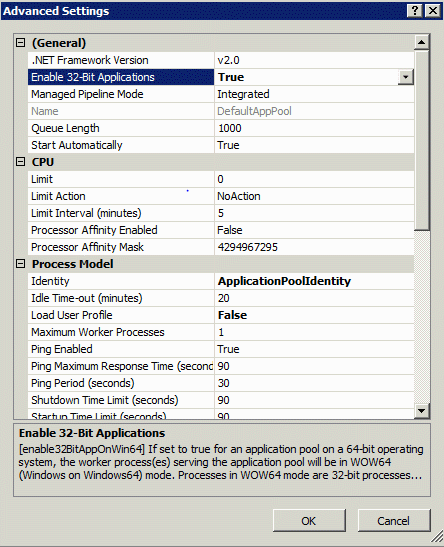
For the appropriate Pool go to Advanced Settings: then Enable 32-Bit Applications and Load User Profile settings, a bit further below this both need to be set to True and OK’d. AWS should then immediately become available.
In the situation prior to resolution even the AWS GetVersions method version will not work, and no errors are logged.