Aurora Systems Manager – Release Notes – 2012 #
Details are displayed in reverse chronological order (latest first)
| Reference | Version | Change | Source of Change | Functions affected by Release | Display Effect | Parameter changes | Database schema changes |
|---|---|---|---|---|---|---|---|
| 2012|11|E | 2.10.19.32034 | Schema v173 development completed. Button for v173 now generally enabled.
This development primarily provides the ServicePack table and update functions described below. |
AIT | Operator id update | None | None | None |
| 2012|10|E | 2.10.19.32034 | A new button ‘Reindex tables’ is provided. A situation was identified where indexes were not being defragmented by SQL monitoring processes causing some degrading of performance. This new function allows a remedy:
If you have SQL 2005SP2 and higher, the function’s script can be run in a quiet time. While it will take some time (around 20-30 minutes), it is as optimized as possible to ensure it finishes quickly and causes minimum disruption to live operations. . The function will rebuild all indexes in every table in the Aurora Database automatically. Please contact AIT if in any doubt on running this function |
VCML | New function as described | New button as described | None | None |
| 2012|9|E | 2.7.16.34041 | A new button is now added to add new Report parameter rows to the local Inst_Reports table to reflect the new Report Procedures:
Following schema update, these two buttons should be invoked to load the new report features |
AIT | New function | New button ‘Load Report Table rows’ | New report definitions loaded as indicated | None |
| 2012|8|E | 2.7.16.34041 | Preparation for version 173. A new table – ServicePack – is added. This table records linked logic processes to add new or missing parameters, or remove redundant parameter rows.
On Backroom start-up, a check is made to determine if a service pack is listed in this new table, and has been applied; if not the linked process will be applied (and any previous outstanding service packs, in sequence). Following implementation, the table will show for example:
And on running Backroom for the first time:
|
AIT | Operator id update | None | None | None |
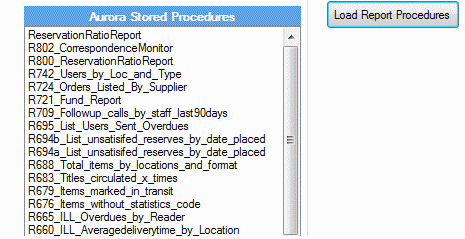
| 2012|7|E | 2.6.1.28198 | This version includes report file definitions in the deployment as stored procedures. These are installed into the setup folder and therefore is accessible via the button to load the Report stored procedures (from the Databases tab):
On completion of the load the database is selected and the stored procedures list is refreshed so that the operator can immediately see that they have loaded ok. Reports will then be available in a later Desktop version. |
AIT | New function | New Stored procedures provided | None | None |
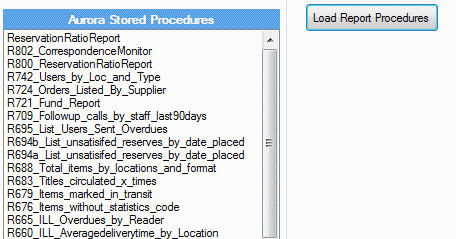
| 2012|6|E | 2.6.1.28198 | This version includes report file definitions in the deployment as stored procedures. These are installed into the setup folder and therefore is accessible via the button to load the Report stored procedures (from the Databases tab):
On completion of the load the database is selected and the stored procedures list is refreshed so that the operator can immediately see that they have loaded ok. Reports will then be available in a later Desktop version. |
AIT | New function | New Stored procedures provided | None | None |
| 2012|5|E | 2.6.1.28198 | Schema v172 development completed. Button for v172 now generally enabled.
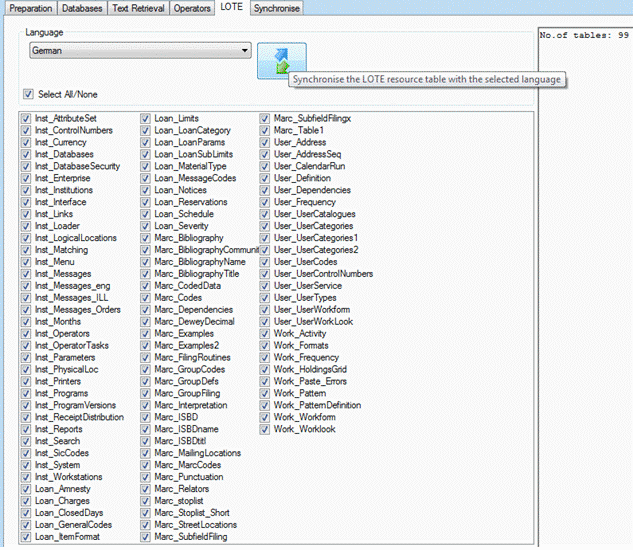
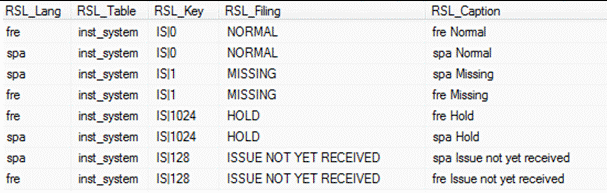
This development provides updates to UserReport for Library for the Blind applications; and improves indexes in support of authority record maintenance It also introduces a new tab in the Systems Manager interface – LOTE. Note that the upgrade to Schema v172 must be completed before embarking on this step. This screen presents a language combo – the languages selected and offered are those listed as user’s languages in the library database. The purpose is to allow for language specific elements in all parameter tables, and so enable language specific interfaces to be built. The LOTE tab presents all the tables to be addressed:
And clicking the Synchronise button will write captions for the selected language to the ResourceLote table. Here is a brief extract showing the table Inst_System, and default entries for item status descriptions in French and Spanish:
Descriptions can be updated as required. |
AIT | Schema update versions availability | Button for v172 now enabled fully | As detailed | As detailed in the ASR for Schema v172 |
| 201|4|E | 2.3.6.17377 | Further extension of operator id updates | NABC | Operator id update | None | None | None |
| 2012|3|E | 2.1.19.22421 | A new tab ‘Operators’ is added. This is provided to assist in the management of operator logons in an Active Directory environment. Specifically, it provides for the update of an operator id, e.g. where the associated network id is periodically changed, so that consistency is maintained throughout Aurora, by replacing all instances in all tables of the current operator id with the new id. | NABC | New function | New tab and screen provided | None | None |
| 2012|2|B | 2.1.19.22421 | The v171 release updated tables correctly, but failed to update the version number. This is fixed in this version. | NSPL | Schema Version now updated in target database | Following schema update, updated version now shown correctly | None | None |
| 2012|1|E | 2.1.11.29645 | Schema v171 development completed. Button for v171 now generally enabled.
This development provides updates to UserReport for Library for the Blind applications; and improves indexes in support of authority record maintenance |
AIT | Schema update versions availability | Button for v171 now enabled fully | As detailed | As detailed in the ASR for Schema v171 |