
User Loans #

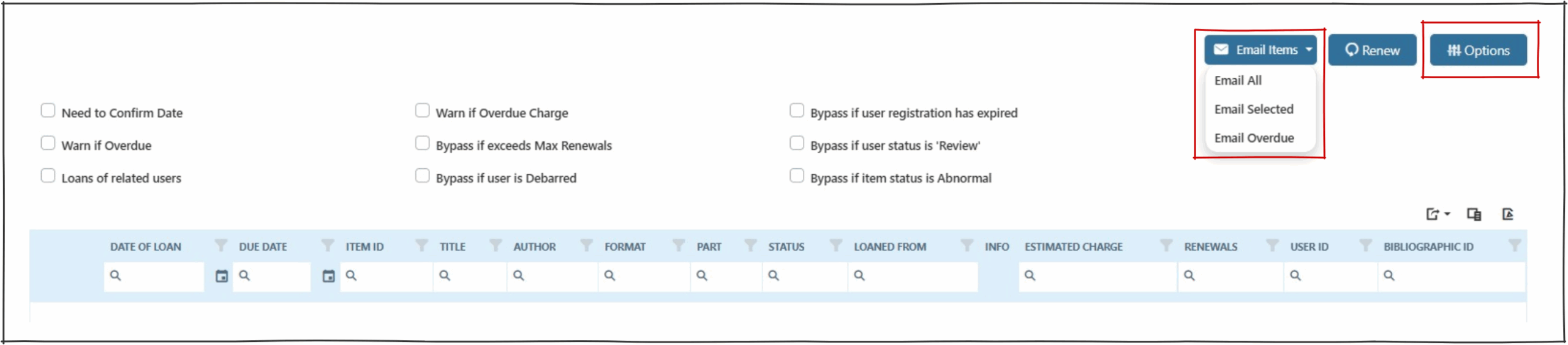
User Loans provides a table view of a selected user’s current loans.
Check Boxes #
The check boxes will display when the options  button is clicked.
- Need to confirm loan date – Provides the option to override the standard due date on renewal. New date will be displayed at this check box.
- Warn if overdue – If the item is overdue, this enables a pop up to display ‘Item is overdue’ and the renewal will fail. If not selected, any overdue item will be able to be renewed.
- Loans of related users – Allows simultaneous display of all loans for related users –(e.g. to allow renewal of all items for a family). These loans are controlled in exactly the same way as the currently selected user’s loans.
- Warn if overdue charge – Allows reporting if an item is sufficiently overdue to attract a charge. With both ‘Warn if overdue’ and ‘Warn if overdue charge’ ticked, or just the ‘Warn if Overdue charge’ ticked, then the renewals are not allowed, and pop up will display an error ‘Item is overdue’. Note that following the above action, no charges are applied to the user’s account. If the same operation is performed without the warning boxes being ticked, the renewals will go through unchallenged, but any accrued fines are charged.
- Bypass if exceeds max renewals – Allows the operator to bypass max renewals of an item. Note The enterprise parameter ‘RenewalsAllowMaxBypass’ must be turned on for this function to work.
- Bypass if User status Is ‘Debarred’ – Allows the operator to bypass user debarral to allow renewal.
- Bypass if User registration is expired – Allows the operator to override a user’s expired registration status.
- Bypass if User Status is review – Allows the operator to override a user’s status (e.g. review).
- Bypass if item status is Abnormal – Allows the operator to override an item’s abnormal status (e.g. any item status other than normal).
Email Items #
Operators can email the user their current loans by selecting the email items button. 
- Email all – All loans will be emailed.
- Email selected – Only the rows selected will be emailed.
- Email overdue – Will email only the user’s overdue items.
User loans results table – right click context menu #

The right click context menu presents the following options for the selected row(s):
- Renew Items(s). This option enables the renewal of the item.
- Return Item(s). This option enables the return of the item.
- Tick/Untick all items – This ticks or unticks all rows in the items on user loans results table.
- Go to item details – This option opens the ‘Item Details’ page of the selected item.
- Go to search and view all items in this work – This option opens the ‘Search’ page displaying the selected item.
- Print out selected items on loan – Creates a popup print preview receipt of the items selected.
Buttons #
 Export – Export all data to Excel OR export elected rows to Excel.
 Column Chooser – Select or deselect the information displayed in columns.
 Export PDF – Exports a basic PDF of loans.