
Notice Templates. #
Aurora has a set of Notice template available for Libraries to use as their own
- Overdue Notice Template
- Reservation Notice Template
- We Miss You Notice Template
- Joining Notice Template – Entity Level Template available within a Consortia – shared subject enterprise parameter
- Advanced Reminder Notice Templates – Consortia Level Notice only –
- Automatic renewal Notice template – Consortia Level Notice only –
- Advanced User expiry Notice Template – Consortia Level Notice only –
Overdue Notice #
Overdue notices are available to communicate with users that their items on loan are overdue and should be returned to the Library
Number of Overdue Notices
Aurora Allows for up to five (5) overdue notice templates that are triggered based on loan parameters.
Example
- Overdue notice 1 – sent 7 days after the due date
- Overdue Notice 2 – Sent 14 days after 1st overdue Notice
- Overdue Notice 2 – Sent 30 days after 2nd Overdue Notice
Overdue notices can be sent at the council/entity Level allowing for individual notices templates withing Consortias.
Overdue Send Formats
Overdue notices can be sent via
- Post
- Message (Dependant on the Library subscribing to messaging service)
Enterprise parameters effecting overdue notices
- EmailReplyToOverdue – (Individual parameters available councils within consortia’s)
- EmailSentFromOverdues – (Individual parameters available councils within consortia’s)
- NoticesOnCloud – (Individual parameters available councils within consortia’s) | Determines if notices are set to run on cloud or manually
- NoticesOnCloudPrinter – (Individual parameters available councils within consortia’s) | If Notices are set to run on the cloud the notices that are set to be printed and mailed are emailed to the address applied in this parameter.
- OverdueItemNotices_subject (Shared parameter within consortia’s)
- SMSOverdueNotices
Sending Overdue Notices
Overdue notices can be run manually from Desktop or set up to run automatically every day on the cloud.
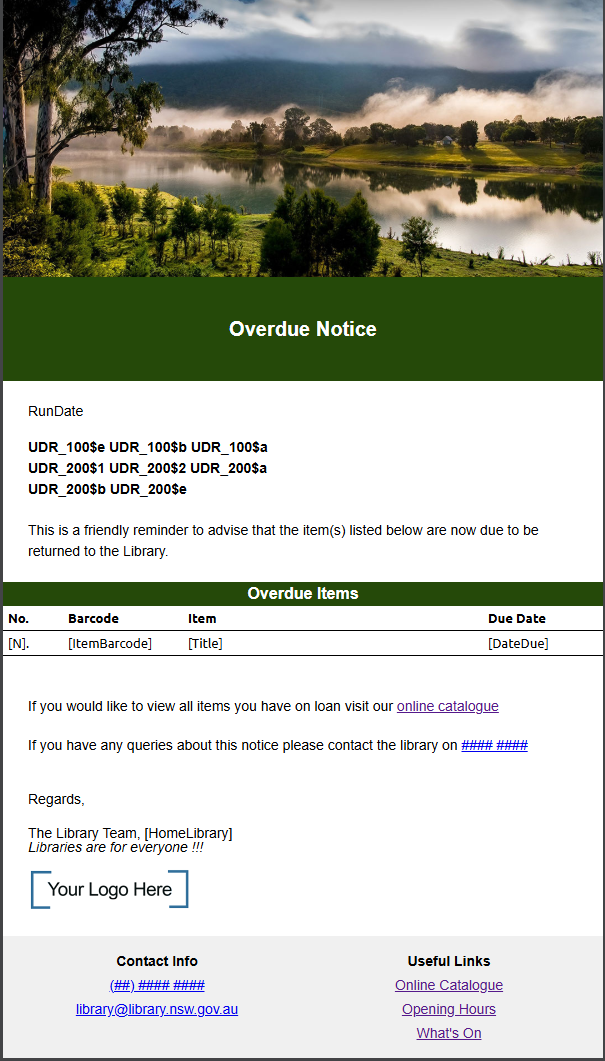
Overdue Notice Template
All customers are welcome to create their own HTML Templates, however Aurora provides a set of HTML notice templates that can be individualise to your library’s needs.
Here is the basic template, showing the initial structure, which uses the keywords which will be replaced in -mail-merge- operations as the notices are produced. For a full List of the Keywords available in each notice template Contact AIT.
Reservation Notices #
Reservation notices are available to communicate with users that Reserved items have been trapped and are on the Reservation shelf awaiting collection.
Number of Reserve Notices
Reserve notices can be sent at the council/entity Level allowing for individual notices templates for each council within a Consortias.
Reserve Send Formats
Reserve notices can be sent via
- Post
- Message (Dependant on the Library subscribing to messaging service)
Enterprise parameters effecting overdue notices
- EmailReplyToReserves – (Individual parameters available councils within consortia’s)
- EmailSentFromReserves – (Individual parameters available councils within consortia’s)
- NoticesOnCloud – (Individual parameters available councils within consortia’s) | Determines if notices are set to run on cloud or manually
- NoticesOnCloudPrinter – (Individual parameters available councils within consortia’s) | If Notices are set to run on the cloud the notices that are set to be printed and mailed are emailed to the address applied in this parameter.
- ReservationNotice_subject (Shared parameter within consortia’s)
- SMSReserveNoticeBypassEmail
- SMSReserveNotices
Sending Reserve Notices
Reserve notices can be run manually from Desktop or set up to run automatically every day on the cloud.
Reserve Notice Template
All customers are welcome to create their own HTML Templates, however Aurora provides a set of HTML notice templates that can be individualise to your library’s needs.
Here is the basic template, showing the initial structure, which uses the keywords which will be replaced in -mail-merge- operations as the notices are produced. For a full List of the Keywords available in each notice template Contact AIT.
We Miss You Notice Template #
A We Miss you notice can be set up by libraries which looks Users who have not been active in the library for a set period of time and send them an email notice
Number of Reserve Notices
We Miss you notice can be sent at the council/entity Level allowing for individual notices templates for each council within a Consortias.
Send Formats
We miss you notices can be sent via
- Email only
Enterprise parameters effecting overdue notices
- UserWeMissYouNoticeDays – (Shared parameter within consortia’s)
- UserWeMissYouNotice_Subject – (Shared parameter within consortia’s)
Notice Criteria
The we miss you notice looks at the enterprise parameter UserWeMissYouNoticeDays to find users who have been inactive for a period longer than is set in UserWeMissYouNoticeDays and also contains the following exception
- Excludes users who have been active between the date of the run and number of days specified UserWeMissYouNoticeDays
- Excludes users with the User Status : Archived, Deleted or Deceased
- Excludes users that have a category other than r = Reader.
- Excludes users who have No marketing information in their privacy settings
- Excludes users who have a debar reason on their account (other than Not debarred)
- Excludes users with no User barcode
- Excludes users with No email address
- Excludes users who have been sent a We miss you notice in the past UserWeMissYouNoticeDays Number of days
Sending We Miss you Notices
We Miss you notice notices can be run manually from Desktop or set up to run automatically every day on the cloud.
Scheduling Code : INSTITUTION WORKSTATION OPERATOR PWD NOTICES USER_WEMISSYOU_NOTICE
We Miss you notice Template
All customers are welcome to create their own HTML Templates, however Aurora provides a set of HTML notice templates that can be individualise to your library’s needs.
Here is the basic template, showing the initial structure, which uses the keywords which will be replaced in -mail-merge- operations as the notices are produced. For a full List of the Keywords available in each notice template Contact AIT.
Advanced User Registration Expiry – Notice #
A We Miss you notice can be set up by libraries which looks Users who have not been active in the library for a set period of time and send them an email notice
Number of Notices
Advanced User Registration Expiry can be sent at the Consortia Level/ Institution Level Only
Send Formats
Advanced User Registration Expiry can be sent via
- Email only
Enterprise parameters effecting notices
- AdvanceRegoExpiryDays – (Shared parameter within consortia’s)
- AdvRegoExpiry_Subject – (Shared parameter within consortia’s)
Notice Criteria
The Advanced User Registration Expiry looks at the enterprise parameter AdvanceRegoExpiryDays to find users whose Registration end date is within the period set in UserWeMissYouNoticeDays e.g the next 7 days
and also contains the following exception
- Excludes users who have been active between the date of the run and number of days specified AdvanceRegoExpiryDays
- Excludes users with the User Status : Archived, Deleted or Deceased
- Excludes users that have a category other than r = Reader.
- Excludes users who have No marketing information in their privacy settings
- Excludes users who have a debar reason on their account (other than Not debarred)
- Excludes users with no User barcode
- Excludes users with No email address
- Excludes users who have been sent an Advanced User Registration Expiry in the past AdvanceRegoExpiryDays Number of days
Sending Notices
Advanced User Registration Expiry notice can be run manually from Desktop or set up to run automatically every day on the cloud.
Scheduling Code : INSTITUTION WORKSTATION OPERATOR PWD NOTICES ADVANCE_USERREGOEXPIRY
We Miss you notice Template
All customers are welcome to create their own HTML Templates, however Aurora provides a set of HTML notice templates that can be individualise to your library’s needs.
Here is the basic template, showing the initial structure, which uses the keywords which will be replaced in -mail-merge- operations as the notices are produced. For a full List of the Keywords available in each notice template Contact AIT.
INSTITUTION WORKSTATION OPERATOR OPPWD NOTICES ADVANCE_USERREGOEXPIRY
Editing Notice Templates #
All Notice templates are able to be downloaded, edited and then replaced from within Aurora Desktop.
Navigate to – Management Tab – Setting – Server files tab.
Downloading a Template
- Ensure Templates is selected. (Top left side of the screen)
- Select the template you wish to edit by clicking on it from the left-hand panel and it will be highlighted.
- Click ‘download selected files off the server button.’ Or right click ‘download’
- The file will appear on the right-hand panel and will be saved in the file designated at the top of the screen under local drive.
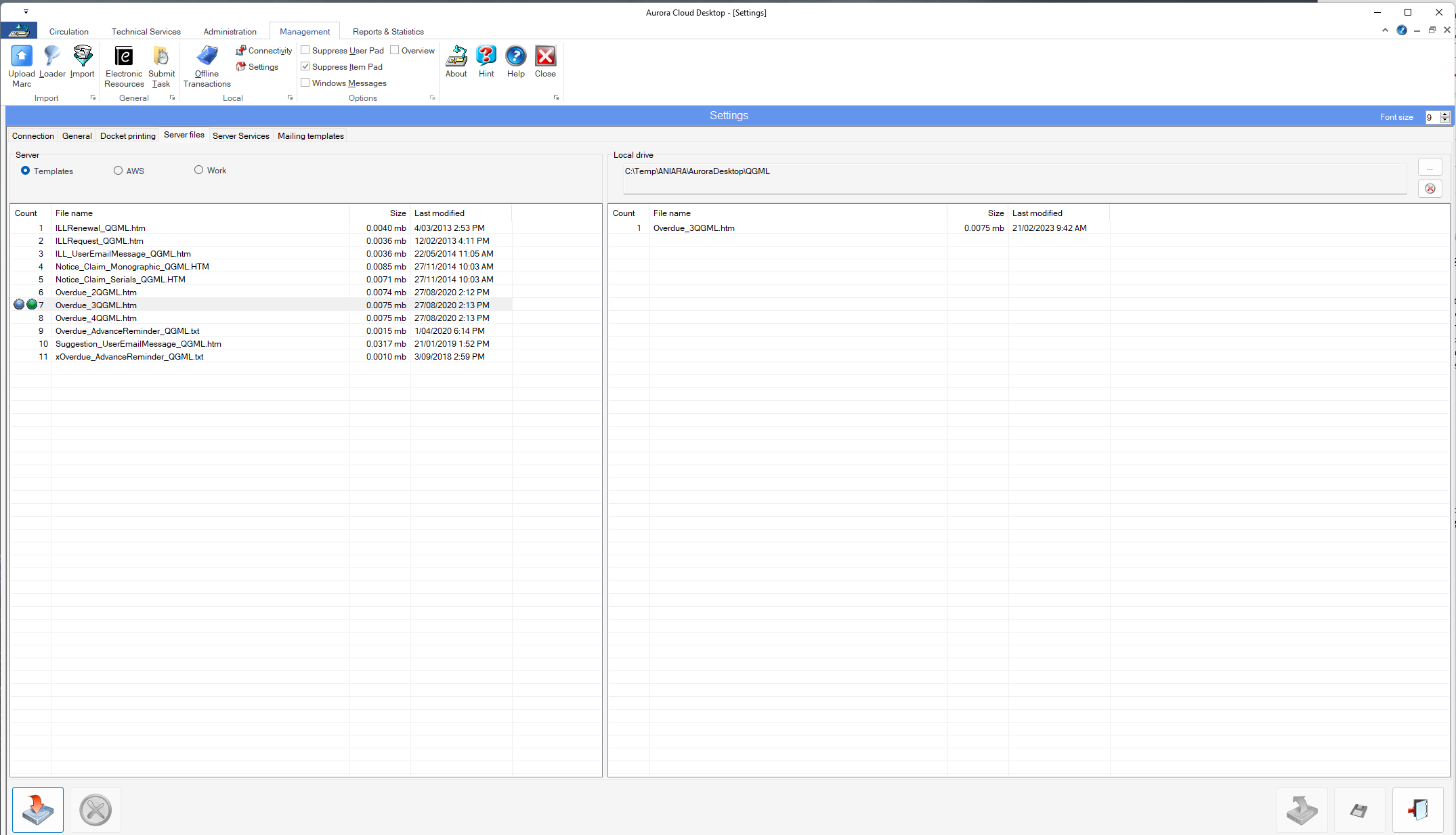
Settings – Server files – Templates
Editing a Template
- To edit the file either right click and open the file and it will open in your default file type to edit and save changes you wish.
NOTE If you would prefer to edit in another program navigate to the file location and open the file with another program e.g. notepad++ and save.
Uploading a template
- To upload the changes to the sever select the file on the right-hand panel and either right click upload or click the ‘upload selected files to the server’ button at the bottom.
The updated template will be uploaded to the server.