Registration Expiry Notice #
Advance ‘User registration expiry’ notices functionality can be run in batch mode and by a scheduling process using Aurora Watcher and Aurora Task applications.
Prerequisites #
- Aurora Systems Manager version 4.3.24 or later must be run to apply additional parameters:
- Enterprise transaction parameter 80 to define the new transaction ‘Advance User Registration Expiry notice sent’
- Enterprise parameter ‘AdvanceRegoExpiryDays’ – this has a default of 7 days indicating the advance notice will go out (by email) 7 days before the user’s registration expires.
- Enterprise parameter ‘AdvRegoExpiry_Subject’ – this defines the email subject for the notice. Note that if the schema is not up to date, this subject line will be truncated.
- Aurora Task version 4.3.24 or later and Aurora Watcher of the same date must also be installed to provide for the new Notice task.
- An appropriate template named UserExpiryAdvanceNotice_<Inst_ID>.txt must be present in the AuroraTemplates folder.
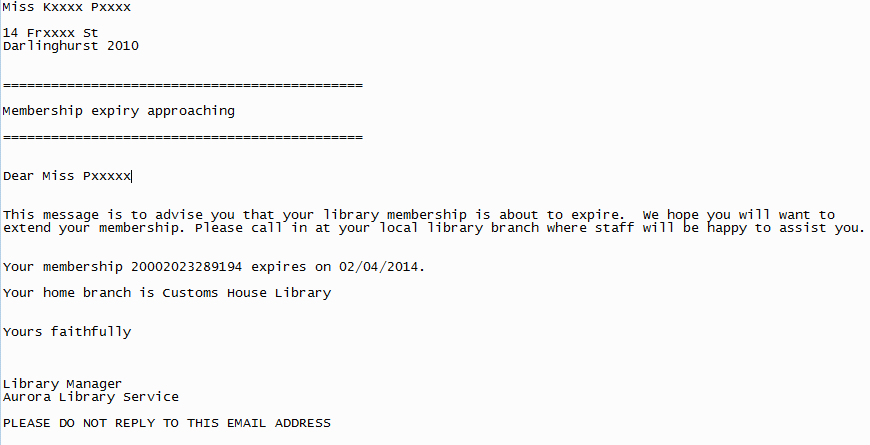
Here is an indicative example of how such a template can be constructed (keywords should be left as noted):
UDR_100$e UDR_100$b UDR_100$a
UDR_200$1
UDR_200$2  UDR_200$a
UDR_200$b  UDR_200$e

=============================================

Membership expiry approaching

=============================================

Dear UDR_100$e UDR_100$a

This message is to advise you that your library membership is about to expire.  We hope you will want to extend your  membership. Please call in at your local library branch where staff will be happy to assist you.

Your membership [UserBarcode] expires on [ExpiryDate].

Your home branch is [HomeLibrary]

Yours faithfully

Library Manager
Aurora Library Service

PLEASE DO NOT REPLY TO THIS EMAIL ADDRESS
Operation #
In scheduled operation, and if the override Test mode is not selected, then the process will simply identify the notice candidates and send the email directly.
Test mode #
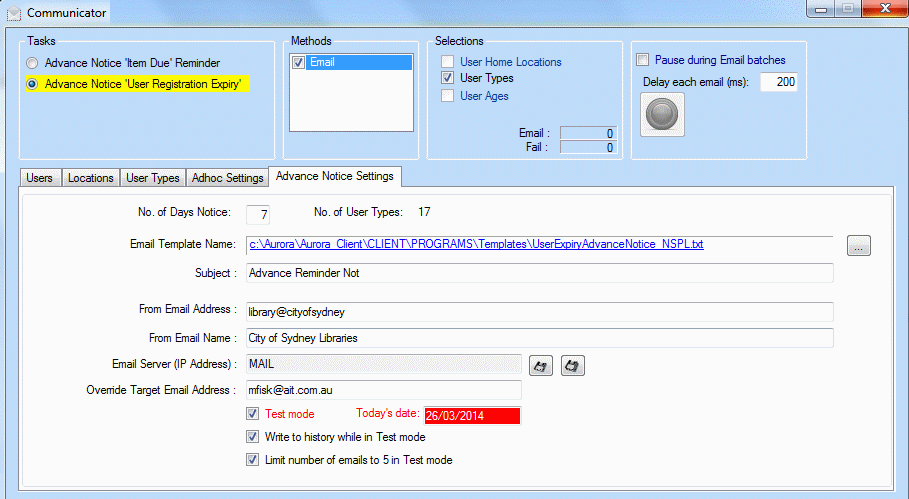
A Test mode is supported, allowing an Override email address to be set, and this will send all email notifications to that specified address.
Communicator #
Watcher will run its ‘Communicator’ form, which will show the progress of the process. There is no need to take any action on this form:
Logs #
Logs detailing success and failure of email despatch are written to the Work folder as
<Inst_ID>_AdvanceUserRegoExpiry_Success_<date>_
In addition, the last notice produced is sent to c:/temp for verification purposes, as LastAdvanceRegoExpiry.txt, e.g.